Timesheet automation that Kim can trust before it touches payroll.
The project now has enough discovery and a first live prototype to move from "what is the process?" to "can Kim and Kiara validate the actual workflow before we wire live writes?" This page maps the operating model, rule book, live prototype pages, Slack handoffs, Toby handoff, settings, and rollback safety layer.
Under-schedule now means actual duration is at or below 15% of expected/manual duration. Priya/Jessica-style examples should pass.
Booking 357934 confirms selected duration via booking endpoint: duration and blocked duration are 155 minutes.
Logs 10% or more over the enriched expected duration route to Kim's exception queue for manual review.
Timesheet Management now exists as a live Dashboards prototype with seeded data for Kim/Kiara review.
Live prototype now available
The prototype is live inside Dashboards and now includes real historical Launch27 pulls, generated rule results, workbook import review, and controlled write/verify/rollback controls for small date-specific batches.
Timesheets Overview
Shows the live historical run, summary status, navigation, filters, pagination, and database-backed rule review table.
Exceptions Review Queue
Where Kim reviews each exception, opens the detail panel, checks evidence, and saves the decision that controls later batch eligibility.
Rulebook
Operator-visible rulebook for confirmed rules, Kim sample travel rules, evidence, and build mapping notes.
Toby Handoff
Shows workbook export, Toby's script, Launch27 travel changes from Toby's workbook, hidden IDs, and Kim's manual Mark Toby Complete gate.
Toby Import Review
New top-level page for checking Toby's returned Google Sheet, matching far-right hidden IDs, respecting column H, and carrying unresolved rows forward.
Apply Adjustments
Models the first-rollout write path: date-specific batches only, visible before/after values, verification after write, and rollback controls.
Settings
Shows which thresholds, cutoffs, access rules, notification channels, and batch limits should be adjustable later.
Audit Log
Represents the future audit trail for decisions, writes, verification, rollback, Slack postbacks, and handoff events.
Current live data baseline
What Kim and Kiara should test now
Current prototype boundary
Save Kim's decision records the review outcome only. It does not write to Launch27. Actioned in Launch27 is the manual-edit path and should auto-refresh/re-read the item where possible. Open Slack thread is Phase 1 visibility for Field Staff Hub-submitted requests only. Actual Launch27 writes belong to the controlled Apply Adjustments flow with date-specific batches, before snapshots, verification, and rollback.
How the automation moves data
The smallest unit is an individual Launch27 time-log row. The review unit is a weekly run snapshot. The safe write unit for first rollout is a date-specific batch.
Where is the button that changes Launch27?
The Launch27 write trigger is Apply selected date batch on the Apply Adjustments page. Earlier buttons read, enrich, review, import, or prepare data. They do not change Launch27 time logs until the date batch is applied.
One Launch27 row for one booking/team/time-log entry. Before values are stored before any controlled write.
The app pulls a week of Launch27 data so Kim can see clean rows, exceptions, rule outcomes, and Toby workbook context together.
First rollout keeps writes to one service date at a time so apply, verify, and rollback stay easy to inspect.
Kim reviews/approves decisions and applies batches. Toby runs the workbook process before the returned sheet is imported.
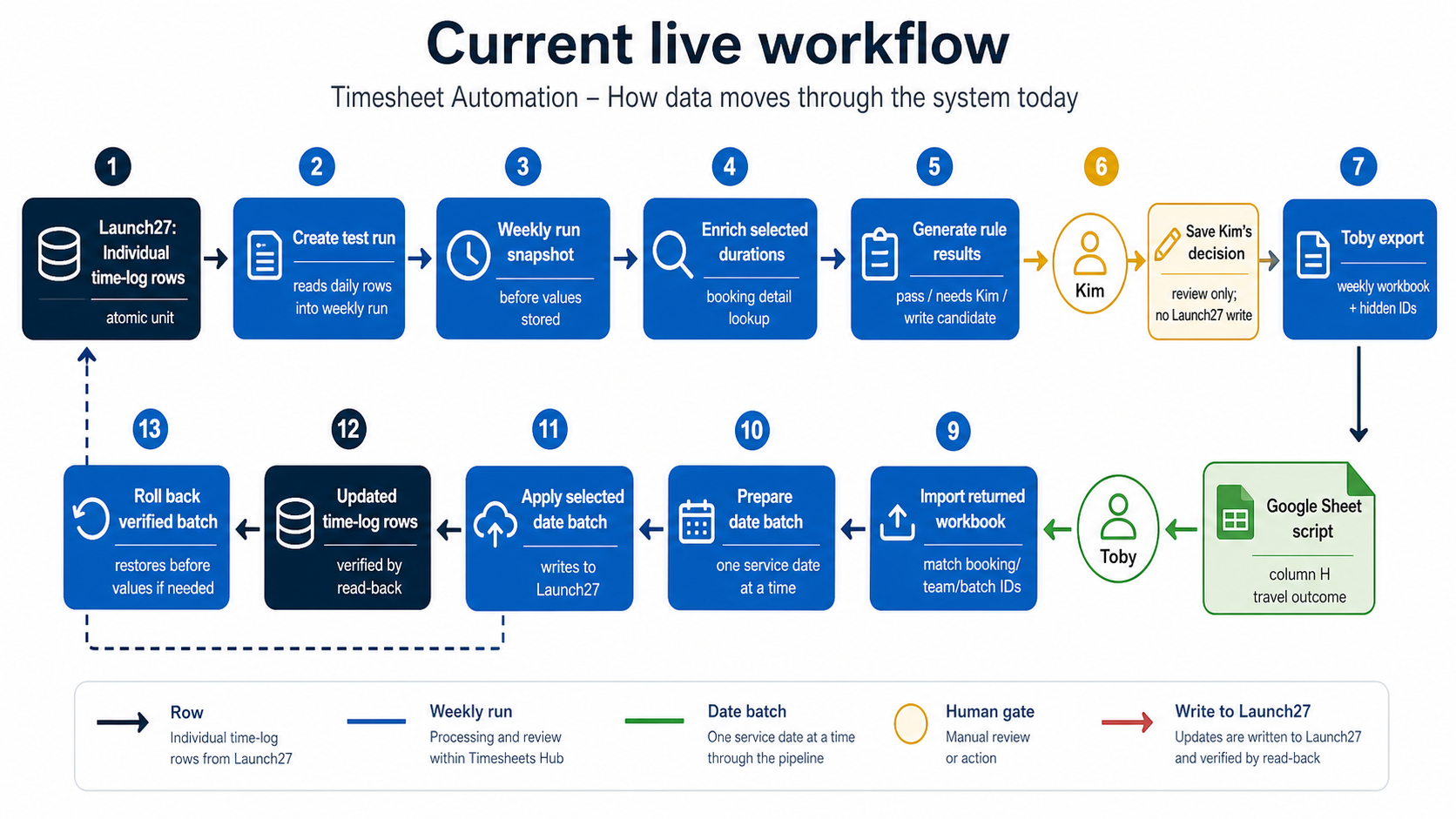
| Trigger Kim sees | What moves | Direction | Does it write Launch27? |
|---|---|---|---|
| Create test run | Launch27 daily time-log rows become a stored weekly snapshot. | Launch27 to Timesheets Hub | No. Read and store only. |
| Enrich selected durations | Booking detail duration/manual duration is added to the stored snapshot. | Launch27 booking detail to Timesheets Hub | No. Read and store only. |
| Generate rule results | Stored rows are classified as pass, needs Kim, exception, or write candidate. | Inside Timesheets Hub | No. Rule evaluation only. |
| Save Kim's decision | Kim's review outcome is saved against a rule result. | Kim to Timesheets Hub | No. It controls later eligibility. |
| Import returned workbook | Toby's returned weekly workbook is matched back using hidden booking/team/batch IDs. | Google Sheet to Timesheets Hub | No. Import/review only. |
| Prepare next date batch | Eligible rows are grouped into a small batch for one service date. | Inside Timesheets Hub | No. It prepares the write package. |
| Apply selected date batch | The selected batch writes proposed values into Launch27, then re-reads Launch27 to verify. | Timesheets Hub to Launch27 and back | Yes. This is the automation processing button. |
| Roll back verified batch | Captured before values are written back into Launch27, then verified by read-back. | Timesheets Hub to Launch27 and back | Yes. Restore path only after an apply. |
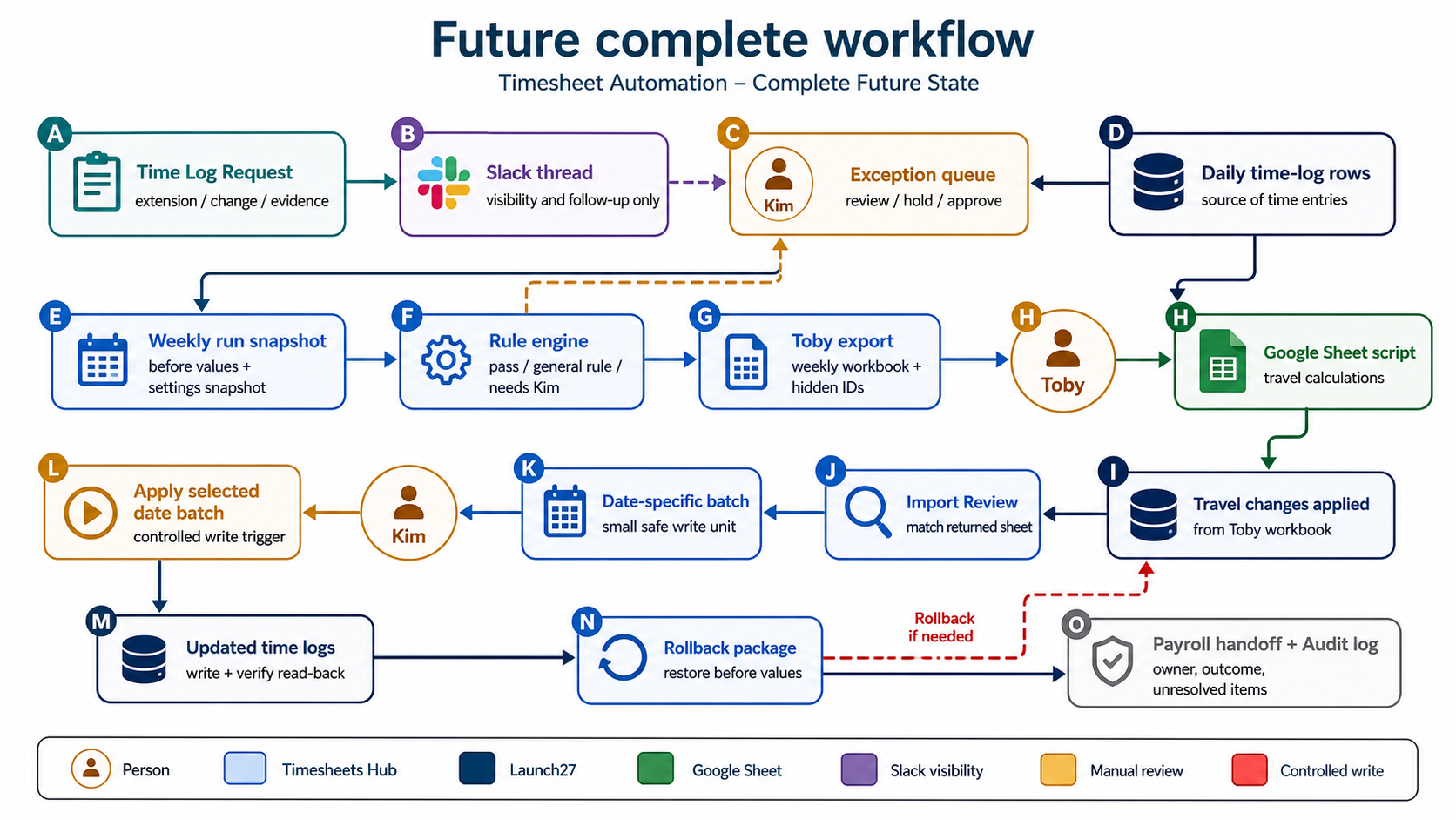
Daily Runs, Exceptions, Toby Import Review, Apply Adjustments, Import History, rulebook, settings model, and write/rollback functions.
Apply stays locked until the selected batch has approved status, an approver, and write items. Rollback stays locked until a batch has been applied or failed after apply.
Field Staff Hub request intake and Slack postbacks will connect evidence and request status without making Slack the source of truth.
Every controlled write has before values, a previewable payload, server-side gates, verification read-back, and rollback support.
Where the project is now
Discovery is no longer blank-page discovery. The current work is consolidation: turn Kim's rules, Slack evidence, proxy behavior, and Toby's sheet into a system blueprint that can be reviewed before build.
Discovery sessions
Kim/Kiara workflow, SOPs, original transcript, and rule worksheet reviewed.
DoneRule book consolidation
Convert answers into explicit approval, exception, adjustment, and evidence rules.
NowData verification
Proxy duration source, Slack forms, Toby sheet columns, and Field Staff Hub staff data.
NowLive prototype review
Team reviews the Dashboards prototype, briefing links, page placement, settings, labels, and safety model.
NowReal data and safe write path
Move from seeded prototype rows to real read-only runs, then prove one small write/verify/rollback test before live reliance.
LaterProduct home decision
There are two related surfaces, but they should not be the same surface. Timesheet Management owns payroll workflow. Field Staff Hub owns staff context and request intake.
Standalone Timesheet Management section
Use a dedicated dashboard section with FSH-style navigation and components. This keeps payroll timing, Toby handoff, Launch27 writes, audit, settings, and rollback in one obvious place.
- Path concept: /timesheets
- Primary users: Kim, Kiara, Jason, payroll/admin reviewers.
- Pages and access are mapped in Interface Map.
- Linked from Field Staff Hub operations and individual staff cards where useful.
Field Staff Hub request intake
Support, dispatch, team leaders, or other field-facing users should submit time requests from Field Staff Hub because they should not need access to payroll-oriented timesheet screens.
- Top-level action button in the existing Field Staff Hub header action cluster.
- One popup form with a request-type dropdown; see FSH Intake.
- Posts status back to Slack and routes review into Timesheet Management.
Interface map
This is the clearest split: Timesheet Management is the payroll operations cockpit. Field Staff Hub is request intake. Slack remains visibility and conversation, not the source of truth for the new workflow.
Timesheet Management section
Standalone dashboard section for Kim and authorised payroll/admin users.
Where users actually work
Weekly timeline
The system needs a timeline view because the real risk is not just approving a single day. It is keeping the handoff sequence stable from service week through payroll payment.
Service week accumulates Launch27 logs, Slack time requests, missing check-outs, manual duration changes, and daily approval runs.
Source weekSystem pulls Launch27 logs, enriches with booking duration, checks Field Staff Hub staff metadata, and separates clean approvals from exceptions.
Approval runThursday logs have a Friday 1:00 PM export path. Friday logs can have a first export and a later V2/catch-up path.
Special timingFinalization package to Toby: approved logs, travel adjustment context, unresolved exceptions, and batch status.
Toby handoffToby target deadline for completing his sheet/script work. Kim records Mark Toby Done in Timesheet Management once he confirms.
Kim gateKim reviews the returned Google Sheet in the new Toby Import Review page, confirms hidden-ID matches, and sends eligible rows into date-specific write batches.
Import reviewSoft payroll cutoff. Remaining issues become highlighted late-risk items, not silent blockers.
Soft cutoffHard payroll cutoff. Anything after this becomes post-cutoff processing with explicit audit and next-cycle handling.
Hard cutoffPayroll/payment follow-through and reconciliation. Dashboard should show what was included, deferred, or manually overridden.
ReconcileRule book draft
The next review should not reopen every rule. It should freeze Kim's three changed rows, confirm UI labels that become system contracts, and treat the rest as confirmed unless someone spots a factual error.
| Area | Working rule | Evidence/source | System behavior | Status |
|---|---|---|---|---|
| Under schedule | Flag only when actual duration is at or below 15% of expected/manual duration. | Kim prototype feedback: Priya D. and Jessica T. pass; trigger points are 27 min for 180 min and 23 min for 150 min. | Rows above the 15% trigger pass the rulebook. Rows at/below the trigger route to exception queue unless a known cancellation/special rule explains it. | Confirmed - corrected |
| Over schedule | Logs 10% or more over the enriched expected duration route to exception review. | Kim follow-up review, Kim worksheet, and proxy verification. | Do not auto-approve overage. Show Slack/FSH request evidence, selected manual duration, and proposed cap/approve action for Kim to manually check. | Confirmed - Kim owner |
| Manual duration | Use booking duration/blocked_duration as selected duration when it differs from time-tracking estimate. | Booking 357934: selected 155 min, time-tracking estimate 135 min. | Enrich every time-log row before variance rules. Manual duration prevents false exceptions, but logs still 10%+ over the enriched duration go to Kim. | Verified |
| Missing checkout | Do not approve until the actual checkout can be confirmed. | SOP and Kim worksheet. | Keep affected booking pending, draft/track follow-up, and show unresolved status. | Confirmed |
| No check-in | Cannot be automatically approved without confirmation. | Kim worksheet. | Exception queue with staff/support evidence requirement. | Confirmed |
| Contractors | Contractors are skipped. No approval needed. | Kim worksheet and meeting discussion. | Use Field Staff Hub staff metadata as source of truth; Launch27 team naming can be secondary. | Confirmed |
| Team leaders | TL logs generally do not need approval. | Kim worksheet. | Skip or classify by Field Staff Hub role. Keep exceptions visible if special booking type requires it. | Confirmed |
| One-on-one | Approve up to 20 minutes. More than 20 minutes requires TL flag/approval. | Kim worksheet. | Cap to 20 unless supported by TL evidence. | Confirmed |
| Induction | Approve up to 1 hour. More than 1 hour requires TL approval/flag. | Kim worksheet. | Identify by induction booking/service wording and route overage for evidence check. | Confirmed |
| First job travel | Travel time and distance for a field staff member's first booking of the day should be set to zero. | Kim follow-up review and Kim worksheet. | Set first-job distance and travel time to zero. Exception: if the first booking was cancelled, the associated travel time may be approved. | Confirmed |
| Cancelled service | Full reported travel time can be approved. Waiting/service time capped at 30 minutes. | Kim worksheet. | Check Launch27 cancelled status, then cap service/waiting to max 30 minutes. | Confirmed |
| Post-cutoff entry | Late logs should not silently flow into payroll. Kim owns the post-cutoff rule. | Kim follow-up review and timeline discussion. | Separate late lane. Kim tracks missing logs until confirmed and flags payroll on any changes. | Confirmed - Kim owner |
Kim confirmed what can remain pending without blocking Toby
Missing time logs with no logs at all, and missing check-in/check-out cases, can remain pending while Kim continues follow-up. They should be visible in the dashboard but should not block Toby's handoff.
Manual duration enrichment
The booking 357934 test changes the implementation assumption. The time-tracking endpoint alone is not enough for the rule engine.
Time tracking says this is an exception
This is why the current enriched time-tracking result is useful but incomplete. It detects variance against the recommended estimate, not the selected/manual duration.
Booking details resolve the exception reason
Manual duration does not mean "no change required." It means the correct expected duration is known. If reported time is still 10%+ over that enriched duration, it routes to Kim; otherwise the system can prepare the right adjustment.
Current vs future surfaces
This is the transition map for Slack forms, Field Staff Hub intake, Kim review, Toby handoff, post-cutoff handling, and Slack postbacks.
Field Staff Hub request intake
Future time-log requests should be submitted from Field Staff Hub, then routed into Timesheet Management for review and automation. Slack remains the notification and follow-up layer, as mapped in Current vs Future Surfaces.
Operational actions
The action sits near existing hub shortcuts such as leave and exit workflows. Users do not need Timesheet Management access.
Submit Time Log Request
One form, two request types. Status posts to Slack and routes into Timesheet Management.
Recommended form fields
| Field | Required | How it should work |
|---|---|---|
| Request type | Yes | Dropdown: Time Extension Request or Time Logs Adjustment. This is one of the wording items to freeze. |
| Submitted by | Auto | Use the signed-in Field Staff Hub user and store their Supabase user ID and Slack user ID where available. |
| Field staff | Yes | Search staff record; link to staff card and use role/employment metadata for rules. |
| Team leader | Auto/edit | Auto-fill from staff/team data, with manual correction when the source data is incomplete. |
| Date of service | Yes | Drives booking lookup, cutoff status, and the Timesheet Management queue date. |
| Affected service | Yes if known | Search by date, staff, customer, or booking. Allow "not sure" so a user is not blocked. |
| Requested change | Yes | Structured choice plus details: add minutes, change checkout, missing log, check-in/out correction, travel, or other. |
| Evidence/approval | Conditional | Required for extensions/overrides: customer approved, TL approved, support note, SMS, app issue, or other. |
| Details and attachments | Yes/optional | Free-text explanation is required; screenshot/SMS upload is optional but encouraged. |
Where this should live
The best placement is the existing Field Staff Hub header action cluster beside Submit Leave and Submit New FS Exit. That matches the current pattern and makes this a simple operational form, not a payroll dashboard.
Timesheet Management mockups
The standalone page should borrow Field Staff Hub's practical dashboard language: left navigation, dense rows, clear status, audit-first actions, and links back to staff cards.
Exception queue
Kim reviewSelected row
Booking detailShow why, not just what
Every row should explain the source data and rule outcome so Kim can trust the automation before applying a batch.
Toby Handoff
Ready to send Monday 6:30 AM. Toby tells Kim when done; Kim records it in the dashboard.
Pending TobyApply Adjustments
Proposed changes are grouped into small batches for testing.
Review firstVerification
After writes, re-read Launch27 and compare actual values to intended values.
RequiredRule Book
The rulebook should be viewable inside Timesheet Management so Kim can see active rules, thresholds, owners, examples, and last-changed history without coming back to this briefing.
Active rules
Rule detail drawer
Click statePending Exceptions
The operational queue Kim works through. It should feel like a triage table with a detail drawer, not a pile of cards.
Exceptions for Thu 7 May
Selected exception drawer
Click stateDaily Runs
The repeatable run page. It shows what was pulled, what rules classified, what is ready, and what changed between refreshes.
Run timeline
Thu 7 MayRefresh behavior
ImportantToby Handoff
The Monday handoff page should make it obvious what is ready for Toby, what is excluded, and whether Kim has recorded that Toby is done.
Handoff package
Awaiting doneClick behavior
WorkflowApply Adjustments
This is the scary page, so it should be the calmest one. It should show proposed writes, before values, after values, and batch size controls before anything touches Launch27.
Ready-to-apply changes
Batch names should explain what Kim is about to apply. During testing, a batch might be "Test batch A - 3 rows"; later it can be grouped by rule type or risk level.
Confirmation before Apply selected batch
You are about to update 3 Launch27 rows in Test batch A. A before snapshot and rollback backup exist. After applying, the system will re-read Launch27 and show any mismatch before the batch can be closed.
Safety gates
RequiredVerification
After writes, the system should re-read Launch27 and show whether each intended value actually landed.
Post-write checks
98% matchedMismatch drawer
If neededAudit Log
The audit page should answer who changed what, why it changed, what evidence supported it, and whether rollback is still possible.
Audit events
Immutable historyClick behavior
TraceabilitySettings
The Settings mockup should be its own page, not only a list of values, because this is where Jason/Kim will tune thresholds and operational contracts.
Rule thresholds
EditableOperational contracts
AdminToby handoff gate
The recommended Phase 1 approach is deliberately simple: Toby continues telling Kim he is done, and Kim records that state in Timesheet Management. That avoids extra Slack automation while keeping the gate auditable.
Kim clicks Mark Toby Done
Toby tells Kim through the normal workflow after his workbook step is finished and the workbook travel changes have been applied in Launch27. Kim opens Toby Handoff, clicks Mark Toby Done, and optionally pastes the Slack link or note.
- One less automation dependency.
- Clear human accountability.
- Unlocks Apply Adjustments only after Kim records the gate.
Slack phrase or reaction
The system could later monitor a fixed phrase/reaction on the handoff thread, but it is not needed for the first build.
- Useful if volume increases.
- Needs channel monitoring and edge-case handling.
- Can still link back to the exact handoff batch.
Google Sheets Apps Script button
A custom menu/button in Toby's sheet could call back to the app or post to Slack when his script is done.
- Useful if Toby wants to stay inside Sheets.
- Needs script permissions and maintenance.
- Not required while Kim owns the gate.
Persisting booking and team IDs
Toby has confirmed his current Google Apps Script only uses column H. The safe contract is still to keep every existing column in place and append internal IDs at the far right.
Recommended sheet contract
Keep Toby's visible/exported columns exactly as they are. Add system-owned ID columns at the far right, ideally hidden or protected: booking_id, team_id, timesheet_batch_id, and row_fingerprint. Customer + team + date matching should only be a fallback reconciliation aid.
Confirmed with Toby: his script only uses column H. Far-right appended ID columns are acceptable as long as the existing sheet order is not changed.
Safety, audit, and rollback
Automated writes should be treated like controlled payroll operations. Before the system changes Launch27, it should know exactly how to prove, verify, and reverse what it did.
Snapshot before touch
Read and store the original Launch27 time-log values for each affected booking/team.
Build change set
Show proposed field changes, rule reasons, source evidence, and affected payroll impact.
Apply date-specific batch
During first rollout, apply only rows for one selected service date so any issue is contained and easy to inspect.
Verify after write
Re-read Launch27 and compare actual post-write values against intended values.
Rollback package
Keep the previous values ready to send back through the proxy if the batch is wrong.
Audit trail
Record batch ID, actor, timestamp, before, after, rule, evidence, proxy response, and rollback status.
Safe proxy write test
This should become a small front-end guided test, not a hidden developer script. The point is to prove the exact workflow Kim will later trust: snapshot first, preview the change, apply one controlled date-specific write, re-read Launch27, then roll back and prove the original value is restored.
Test one old, low-risk row through the UI
Use a completed service date from a closed payroll week. Jason suggested Sunday 10 May to Saturday 16 May 2026 as the candidate week because payroll has already been paid. The final test row still needs to be explicitly nominated before touching it.
What success looks like
A no-op write is not enough to prove rollback. A successful test is one where the UI can show an operator the full chain without asking them to trust a background script.
Recommended first front-end version
Add a restricted Safe Write Test panel inside the future Apply Adjustments or Audit area. It should have three operator-facing buttons: Capture Before Snapshot, Apply 1 Test Write, and Roll Back Test Write. Each button should be disabled until the previous proof step is complete.
Batch and rollback model
The build should store rollback data as first-class records, not as a spreadsheet afterthought. The system must always know what it saw before, what it intended to write, what Launch27 returned, and what it verified afterward.
Kim reviews a proposed batch
The screen shows plain-English rows: current value, proposed value, rule reason, evidence, and payroll impact.
System stores the before state
Before Launch27 is touched, the original values are saved as the rollback source of truth.
Kim applies a small batch
A confirmation explains exactly how many rows and fields will change, then the proxy write runs.
Verification finds a mismatch
If Launch27 shows a different value than intended, the batch cannot be quietly closed.
Kim chooses Roll back batch
The rollback action previews the exact previous values and asks for confirmation before reversing the write.
System re-verifies and audits
Launch27 is re-read again. The audit log records who applied, who rolled back, and what changed.
Why this matters to Kim
Rollback is not a mysterious technical table. It is the safety net behind the Apply Adjustments page: if a batch writes the wrong value, Kim can see the mistake, preview the reversal, click Roll back batch, and prove the row returned to its original Launch27 value.
| Record | Purpose | Minimum fields |
|---|---|---|
| timesheet_run | One service-day or service-week processing run. | date range, status, pulled_at, locked_at, created_by, source snapshot reference. |
| timesheet_log_snapshot | Immutable before-touch source data. | run_id, booking_id, team_id, raw_before_json, enriched_json, captured_at, fingerprint. |
| timesheet_decision | Why the row is approved, held, routed to Kim, excluded, or post-cutoff. | rule_code, rule_label, decision, owner, evidence references, notes. |
| timesheet_write_batch | Kim-approved group of Launch27 writes. | status, applied_by, applied_at, proxy request/response, verification summary, rollback status. |
| timesheet_write_item | Before/after/verify/rollback for one booking/team row. | before_values, after_values, verify_values, rollback_payload, verification_status, rollback_status. |
| timesheet_request | Field Staff Hub intake submission. | submitter user/slack IDs, request type, staff, booking, date, requested change, evidence, Slack thread, status. |
| audit_event | Human-readable and machine-searchable history. | actor, action, target type/id, before/after references, timestamp, notes. |
Settings page
Settings should be the small set of operational choices Kim/Jason may reasonably need to tune without a code change. Each setting needs context, audit history, and "applies to future unlocked runs" behavior.
Next steps after live prototype
Kim has now confirmed the main rule-book items and the first prototype is live. The next review should focus on whether the live screens are understandable enough for Kim/Kiara to trust the flow before real Launch27 writes are connected.
Kim/Kiara prototype review
- Review Exceptions: does each item show enough evidence and the right actions?
- Review Rulebook: confirm travel, missing logs, over-schedule, manual duration, first-job travel, and post-cutoff wording.
- Review Toby Handoff: confirm workbook export, Toby script, Launch27 travel updates from Toby's workbook, Mark Toby Complete, returned-sheet import, and non-blocking pending logic.
- Review Toby Import Review: confirm this is the right top-level place to check Toby's returned sheet and carried-forward rows.
- Review Apply Adjustments: confirm date-specific batches, preview payload, apply, verify, and rollback language.
- Review Settings: confirm what should be adjustable later.
- Review Field Staff Hub Time Log Request intake and confirm form wording, required fields, and who should see the button.
Technical and safety checks
- Sheet contract is now confirmed: Toby's script uses column H, so append IDs at the far right without changing existing columns.
- Use Sunday 17 May to Saturday 23 May 2026 as the safe historical week candidate; keep production write batches date-specific for first rollout safety.
- Build the front-end Safe Write Test panel with Capture Before Snapshot, Apply 1 Test Write, Re-read Launch27, Roll Back Test Write, and Verify Restored states.
- Accept the batch/rollback model: snapshots, decisions, write batches, write items, requests, audit events, and rollback retention.
- Use Kim's manual Mark Toby Done gate for Phase 1 instead of automating Toby's Slack signal.
- Have Sam review the frozen live-prototype briefing against the Field Staff Hub and dashboard codebase before deeper build work starts.
What remains for the overall project
Stepping back, the project is past discovery and live prototype validation has started. Real historical data and rule results are now visible; the remaining work is decision persistence, manual verification, write batches, rollback, and supervised payroll operation.
Prototype feedback
Kim and Kiara review the live screens and briefing, then confirm wording, missing actions, confusing labels, and access expectations.
NowReal read-only data
Historical Launch27 pull is live for the 17-23 May 2026 week. Manual duration enrichment remains the next data layer.
StartedRules against real weeks
Current generator has produced real rule results. Next is persisting Kim decisions and turning eligible rows into controlled write batches.
StartedSafe write test
Use the front-end Safe Write Test panel to prove one row can be written, verified, rolled back, and verified restored.
Safety gateControlled batch apply
Enable small approved batches only after snapshots, decisions, verification, rollback, and audit are working end to end.
LaterShadow payroll cycle
Run at least one payroll cycle where Kim compares the system output with the current process before relying on automation.
LaterOperator documentation
Document Kim's review flow, Toby handoff, Field Staff Hub request intake, settings, rollback, and escalation rules.
LaterGo-live
Move from supervised use to normal operation only once the team trusts review, write, verification, rollback, and audit behavior.
Final